Efficient Minecraft plugin development
Ever since I started writing plugins, the thing that bothered me the most was the friction with iterative development: build, copy the jar, restart the server, test… repeat.
Over the years I collected a bunch of small improvements that together make the whole process almost seamless. Nothing groundbreaking, just things that save a few seconds every time which adds up pretty quickly.
What I use
- IntelliJ IDEA
- Gradle with kotlin-dsl
- Java 21
Automatic jar copy
A small Gradle task that copies the built jar directly into the server’s plugins folder:
tasks {
    register<Copy>("buildAndPush") {
        dependsOn("shadowJar") // Replace with build if not using shadow

        // Always copy to output
        outputs.upToDateWhen { false }

        val projectName = project.name
        val version = project.version

        from("build/libs/$projectName-$version.jar")
        into("../00-paper/plugins/")
    }
}
Remote debugging
You can get full debugging and hot-reload support by remotely attaching a JVM debugger to the server.
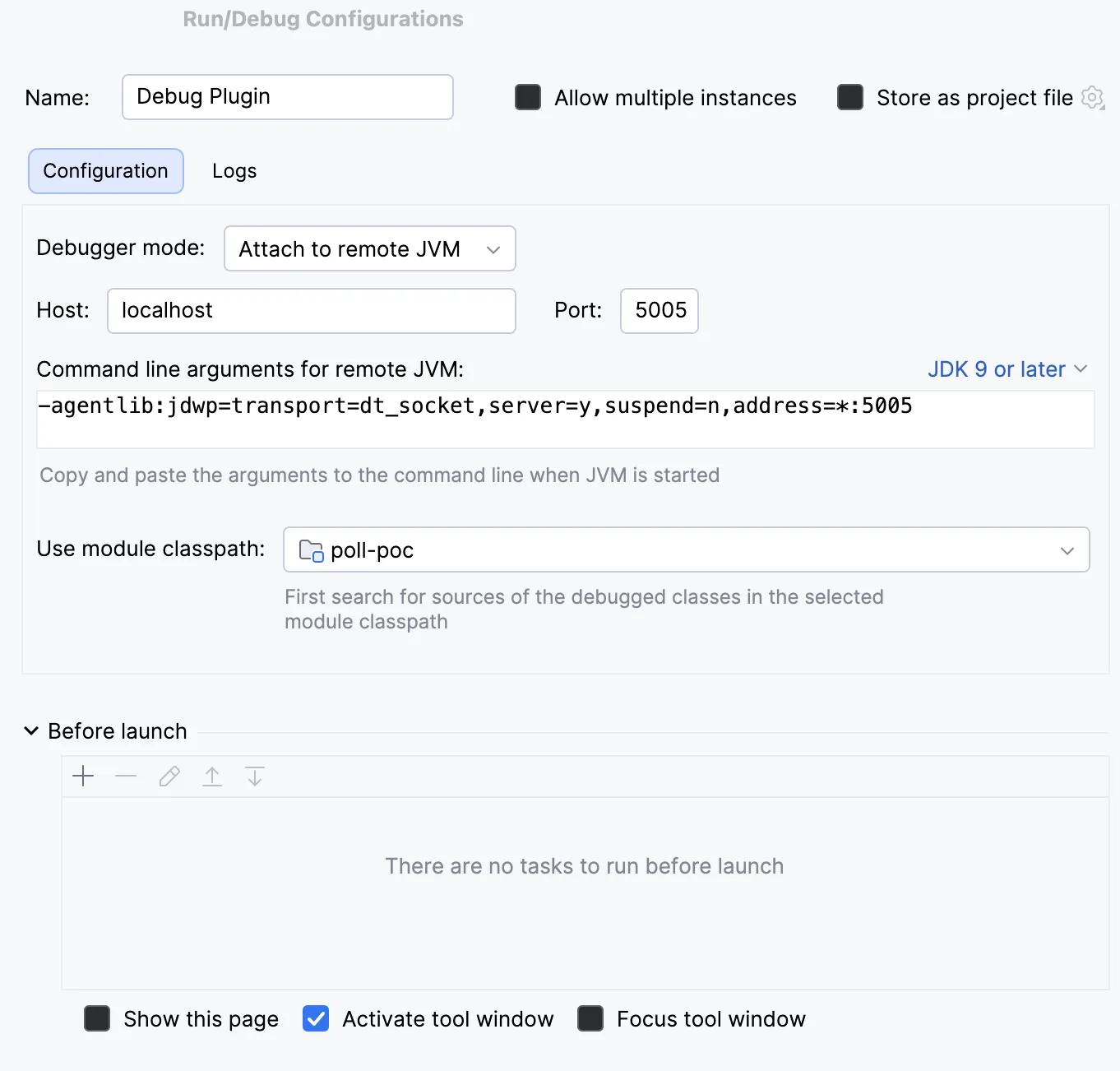
- In the IDE run configuration add a new
Remote JVM Debugconfiguration. - Copy the automatically generated jvm arguments (they should look similar to this).
-agentlib:jdwp=transport=dt_socket,server=y,suspend=n,address=*:5005 - Add the arguments to the server startup script.
- Start the server.
- Click debug on the created run configuration.
- Profit!
Hot-reloading
Use Jetbrains Runtime which supports hot-reloading code changes when debugging.
Add the following JVM argument to the server startup script.
-XX:+AllowEnhancedClassRedefinitionMost code changes that are outside the initial plugin onEnable logic should be hot-reloadable.
For an extra speedup, attach a keybind to hot-reload changed code - the action is called Reload Changed Classes.
This has its limitations, and any significant changes might result in an error which will require updating the jar and restarting the server.
Running the server with the IDE
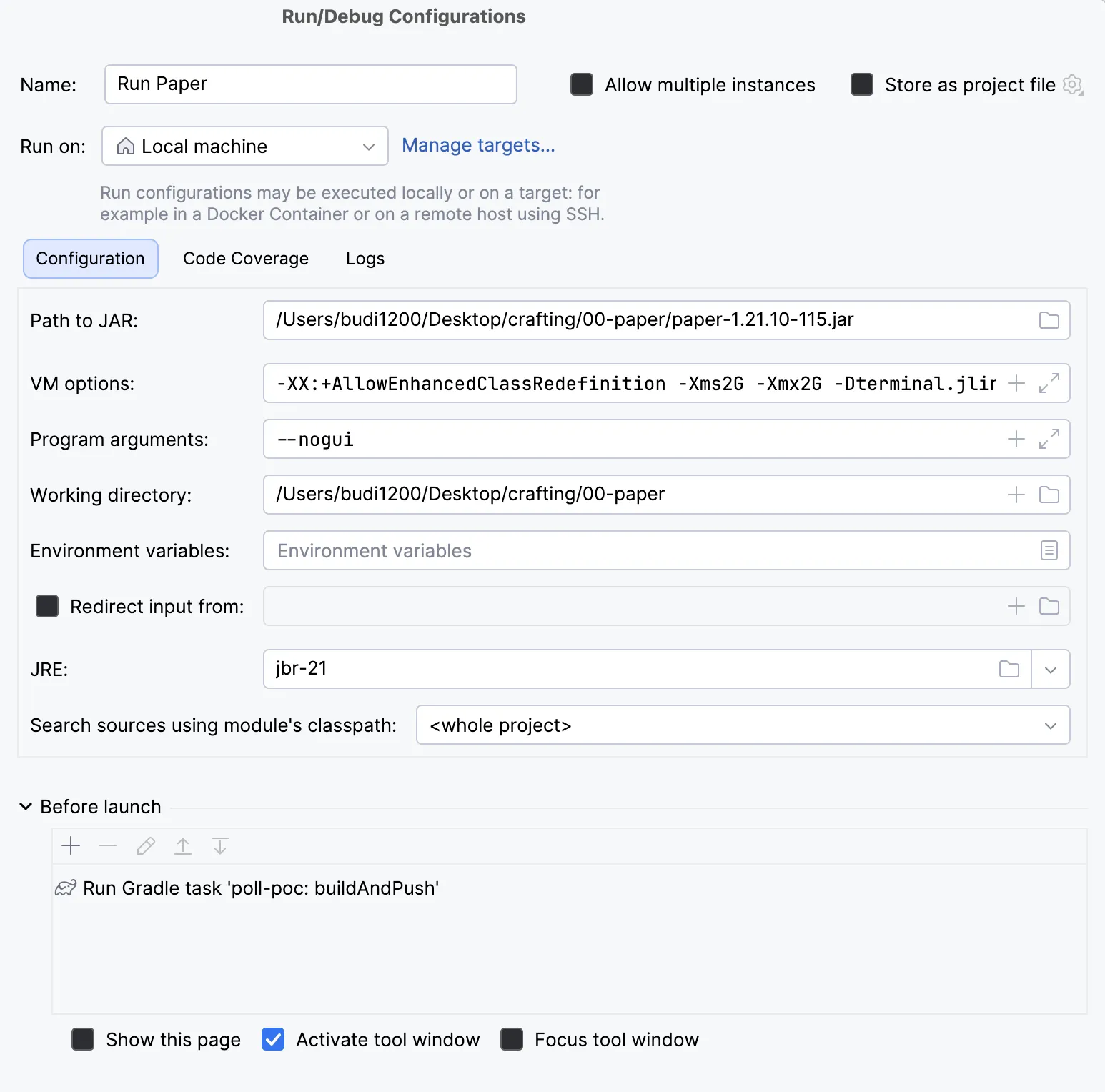
I found the most optimal setup is to run the dev server directly with the IDE, which brings debugging and hot-reload support without any extra setup.
Run configuration
- Create a new
JAR Applicationconfiguration. - Path to jar: point it to your server jar.
- VM Options: standard server flags.
- Program arguments:
--nogui. - Working directory: set this to the server folder.
- Before Launch: add
Run gradle taskand selectbuildAndPush.
Faster server startup
Most of the time Nether and The End worlds aren’t needed for testing. Disable them to speed up server load times by not having to load them at all.
Disable Nether
The old allow-nether=false property was removed from server.properties. Paper brought it back in its own config config/paper-global.yml:
misc:
    enable-nether: false
Disable The End
Disable End in bukkit.yml.
settings:
    allow-end: false
Enable colors in console output
By default, the server logger won’t output ansi colors. We can enable them with JVM arguments to improve console readability.
-Dterminal.jline=true -Dterminal.ansi=true